The Archive tab (administrators)
Documents are never deleted just because their owner's account is removed — they're kept here instead, grouped by the person who used to own them. Each group's header reads "<name> · account removed · <date>", with a line saying how many of that owner's documents are showing (this counts only what's on the current page — it's not a total, since a search or filter can be narrowing the list).
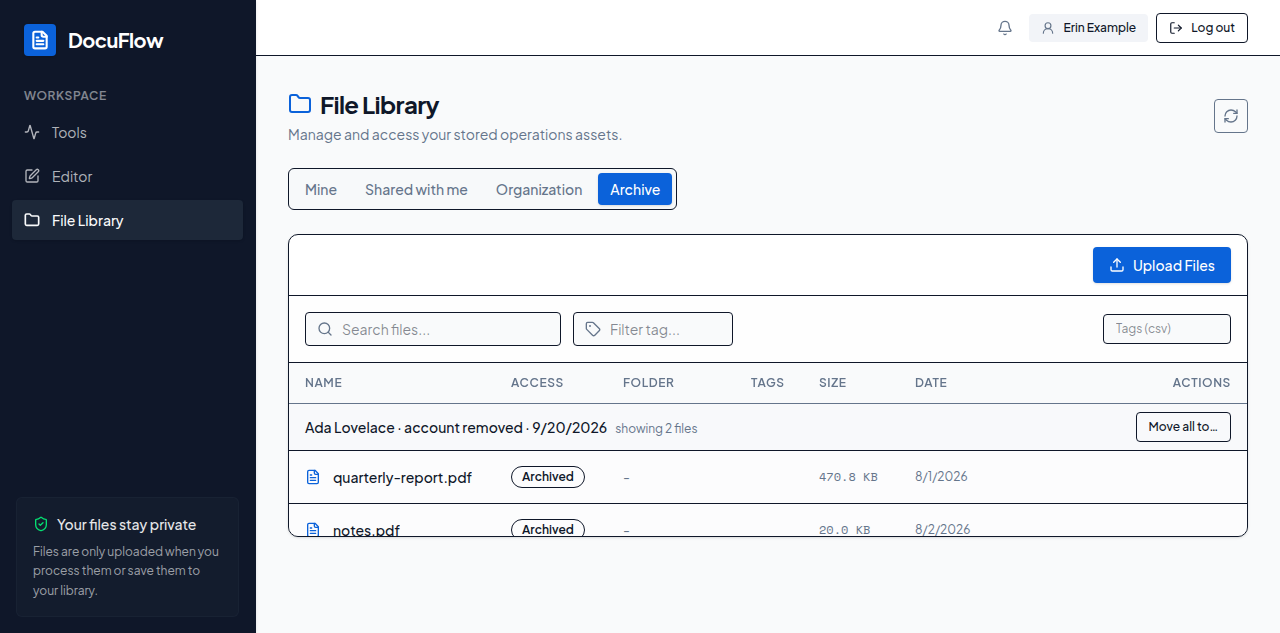 Figure: the Archive tab, administrators only — documents kept behind after an account was removed.
To give all of a former owner's documents to someone else at once: select Move all to… on their group header. A dialog opens; search for the new owner the same way as transferring a single file (see Transfer ownership in The file table). Once you pick someone, it reads "Move everything <name> left behind to <new owner>? This moves every file of theirs, including any not shown here." before you confirm with Move all — deliberately naming no count, since this moves every document that person ever owned, not just the ones currently on screen. What you'll see when it's done: "Moved <number> file(s) to <new owner>."