Activity log
Shows everything everyone has done in DocuFlow, including administrative actions — the same idea as your own Your activity page (see Activity), but for everyone, and searchable.
To find events:
- Open the Audit log tab.
- Narrow the list with any combination of: User (a subject or email), Action (a dropdown of every kind of event, including administrative ones), From / To dates, and Search (a file name or email).
What you'll see when it's done: a table of matching events — When, Who, Action, Target, Source — newest first. Select a row's expand arrow to see the plain-language sentence, a list of details (or "This event carries no details."), the raw event data, and a Copy as JSON button. Reaching the end of the loaded rows shows a Load more button.
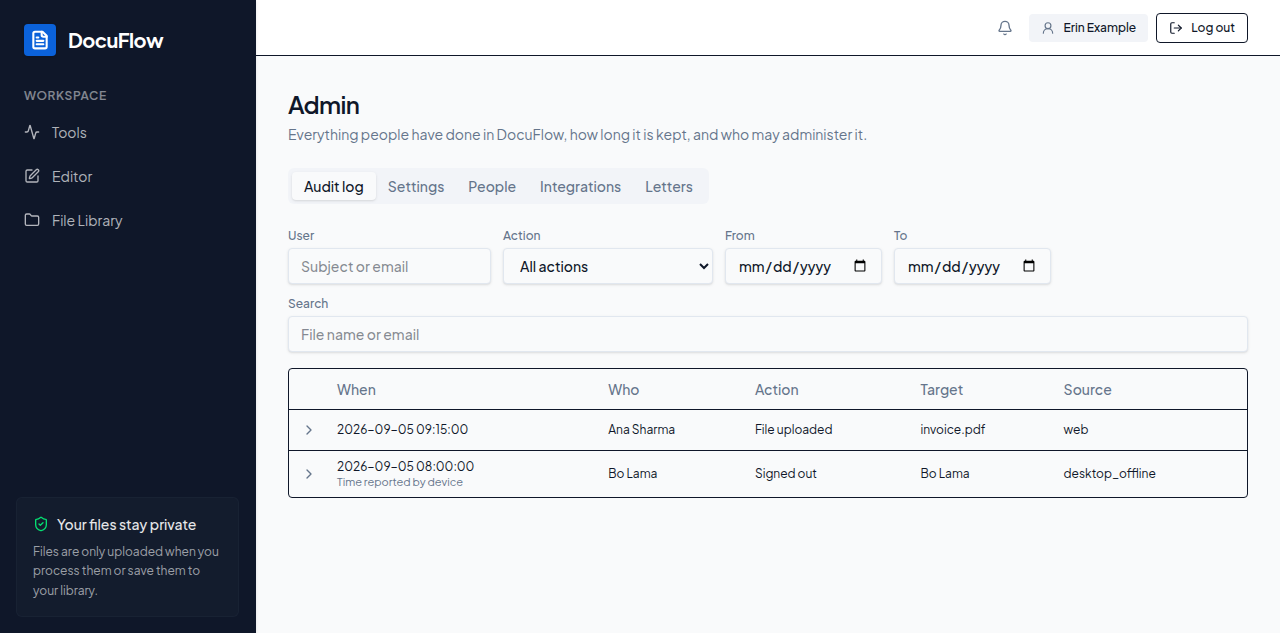 Figure: the Audit log tab, open on the admin area.
If something goes wrong
- You're not an administrator: "You are not a member of the admin group, so the audit log is not available."
- It fails to load for another reason: "The audit log could not be loaded. Try again in a moment."
- Nothing matches: "No audit events match these filters." / "Widen the date range or clear the search to see more."